


Important notes:
・During the update (when performing steps 7 described below), ensure that the digital photo frame and the AC adaptor are placed on a stable location, so that the AC adaptor may not be removed and the digital photo frame is not turned off.
Loss of power during the update may cause the digital photo frame to malfunction.

 ≫
buttons.
≫
buttons. ≫
buttons, and press the ≪
≫
buttons, and press the ≪ (ENTER)≫
button.
(ENTER)≫
button.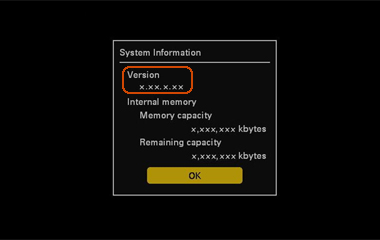
(ENTER)≫
button after you have checked the firmware version.
[Supported operating systems]
One of the following types of recording media (Memory capacity is between 32 MB and 32 GB).
See "About the memory cards" in the device's Operating Instructions for more details about compatible recording media.

 |
 |
 |
|||
|
|
|
|||
 |
|
 |


The following section describes how to update using a “Memory Stick” / “Memory Stick Duo”. If you are using an SD memory card, please replace “Memory Stick” / “Memory Stick Duo” with your using memory card in the following explanations.
Prepare an initialized (formatted) “Memory Stick” / “Memory Stick Duo”. For details about how to initialize (format) it, please see the Operating Instructions of your digital camera.

Copy the update files to the “Memory Stick” / “Memory Stick Duo” using either of the following methods:
Insert the initialized (formatted) “Memory Stick” / “Memory Stick Duo” into the Memory Stick slot on your computer.
Open the DFE710V2 folder on your desktop, and copy the update file DFE710V2.VUP inside it to the “Memory Stick” / “Memory Stick Duo”.
Drag and drop the update file to the root of the “Memory Stick” / “Memory Stick Duo”, without creating any new folder for it.
Insert the initialized (formatted) “Memory Stick” / “Memory Stick Duo” into the Memory Stick slot on your digital camera.
Connect your digital camera to your computer using a USB cable.
Open the DFE710V2 folder on your desktop, and copy the update file DFE710V2.VUP inside it to the “Memory Stick” / “Memory Stick Duo” that you have inserted into your digital camera.
Drag and drop the update file to the root of the “Memory Stick” / “Memory Stick Duo”, without creating any new folder for it.

 (POWER)≫ button is red).
Insert the “Memory Stick” / “Memory Stick Duo” containing the copied update file into the Memory Stick slot on the digital photo frame.
(POWER)≫ button while pressing and holding down the ≪VIEW MODE≫ button.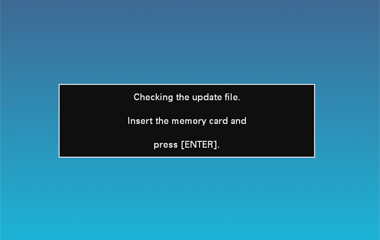 (ENTER)≫ button.
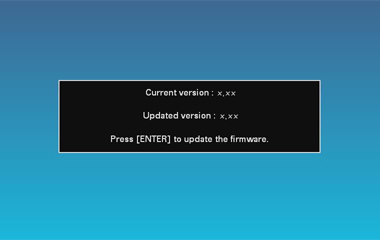 (POWER)≫ button is green, press the ≪(POWER)≫ button to turn off the power, and start the update process again from "Step 7. Update the firmware". (ENTER)≫ button.(POWER)≫ button to turn of the power of the digital photo frame.
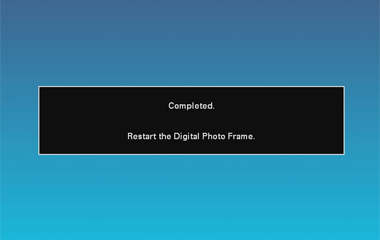
 (POWER)≫ button.≫ buttons.≫ buttons, and press the ≪ (ENTER)≫ button. (ENTER)≫ button after you have checked the firmware version.
This completes the update procedure of the firmware.



