Click on one of the files below NEX-VG10V3_Update1112a.dmg to begin download.
Please save the downloaded file onto the Desktop of your computer (recommended).
 |
 NEX-VG10V3_Update1112a.dmg NEX-VG10V3_Update1112a.dmg[ File size : 57.2 MB (57,196,000 bytes) ] |
 |


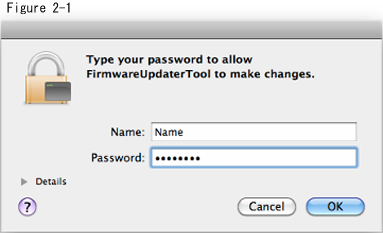
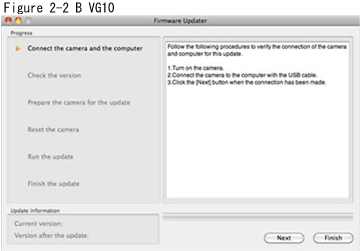

Remove the memory card from the camera beforehand.
 |
 |
 |
|
|
 |
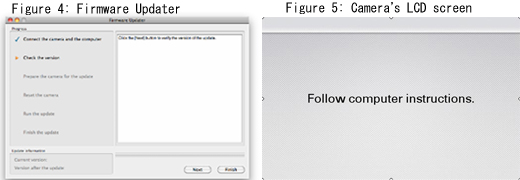
When the camera is connected to the computer, the LCD screen of the camera turns off. Please proceed to the next step. | |
 |
|
 |
|
※If the LCD screen of the camera dose not turn off, please try the following methods.
* Disconnect the USB cable from the camera, then reconnect the USB cable.
* If there are another USB terminal with the computer, reconnect the USB cable to another USB terminal.
|
|
|
|
|
|
From now on, never turn off the camera until the firmware upgrade is completed. | |
|
|
|
|

|
|
|
|
|
|
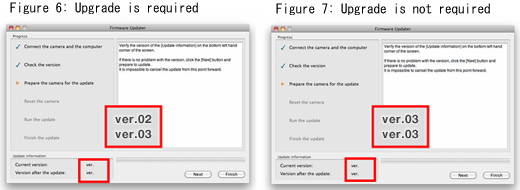
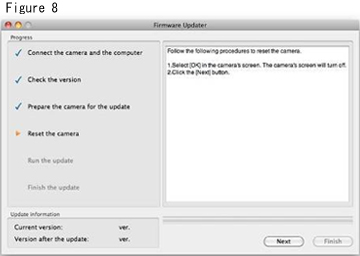
If the screen on Figure 7 appears, the upgrade is not required. According to the message, stop the USB connection and click [Finish]. Turn off the camera, remove the battery pack or the AC adaptor, and then turn on the camera again. |
|
|
|
|
|

|
|
|
|
|
|
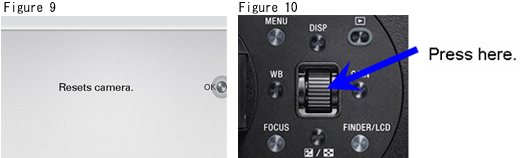
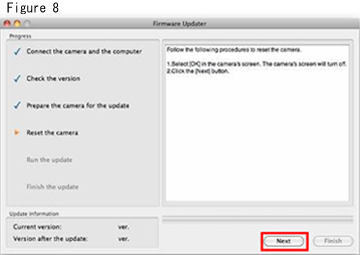
The screen turns off when the center of the control wheel is pressed. Please proceed to the next step. | |
|
|
|
|

|
|
|
|
|
|
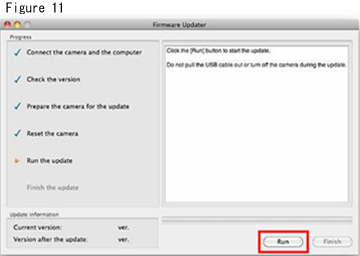
Never turn off the camera nor disconnect the USB cable while upgrading. |
|
|
|
|
|

|
|
|
|
|
|
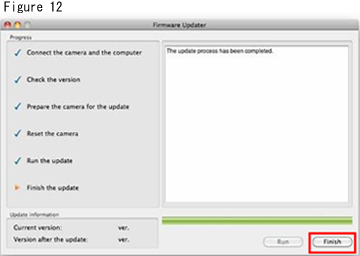
After finished the upgrade, turn off the camera, remove the battery pack or the AC adaptor, and then turn on the camera again. |
|
|
|
|
|

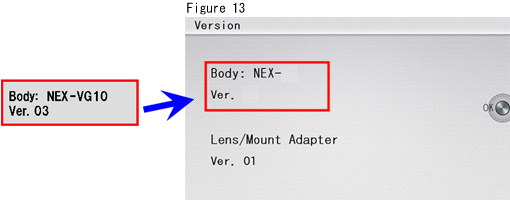
Follow the instruction below to confirm the firmware version is Ver.03.
Select [Menu] - [Setup] - [Version] on the camera.
The firmware version is displayed (Figure 13).