The folder structure of the IC recorder is as follows:
 : Folders copied using Digital Voice Editor : Folders copied using Digital Voice Editor
(They have been already made when you purchase the IC recorder)
 : Folders copied from a computer : Folders copied from a computer
(They are displayed when music files have been transferred from a computer)
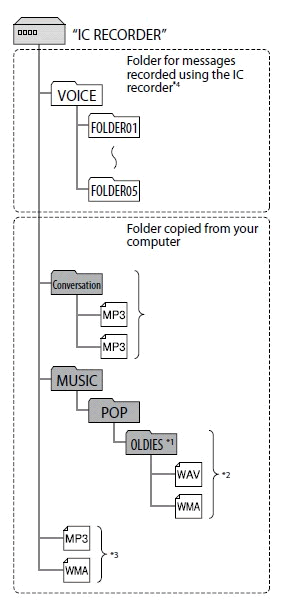
*1: The name of a folder in which MP3/WMA/LPCM <Linear PCM> (.wav) files are stored will be displayed on the IC recorder as it is, so it is convenient if you put an easy-to-remember name on the folder in advance. Folders shown in the illustration are examples of folder names.
*2: The IC recorder can recognize MP3/WMA/LPCM <Linear PCM> (.wav) files up to three levels of folders copied to the IC recorder. Therefore, the IC recorder cannot recognize MP3/WMA/LPCM <Linear PCM> (.wav) files stored in more than four levels of folders.
*3: If you copy MP3/WMA/LPCM <Linear PCM> (.wav) files separately, they are classified as being in "NO FOLDER."
*4: When you copy MP3/WMA/LPCM <Linear PCM> (.wav) files to the IC recorder, please create folders in the same level as the VOICE folder and transfer MP3/WMA/WAV files to the folders. A file cannot be played back, even if you transfer it to the VOICE folder.
[Notes]
You cannot copy 511 or more folders (except for VOICE folders) or files to the root directory that is located immediately below "IC RECORDER" on the computer. This is due to system limitations of Windows or Macintosh. |



